Costco Laptop Clearance Trends and Insights
hs ago. I wandered past the electronics section, saw a bright yellow “Clearance” tag on a Lenovo laptop, and my nerd brain fully activated.
I pulled out my phone, started checking model numbers, historical prices, and specs right there in the aisle. Since then, I’ve been deliberately tracking Costco laptop clearance patterns—both in-store and online—and the trends are surprisingly consistent.
This isn’t a hype piece about “secret Costco hacks.” Some of the deals are fantastic, some are meh, and some are only “deals” if you ignore the spec sheet. Here’s what I’ve actually seen and tested.
How Costco Laptop Clearance Really Works
When I first dug into this, I assumed clearance meant “old junk nobody wants.” That’s not what I found.
From my experience and conversations with a couple of Costco floor associates (shoutout to the very patient guy in computers at my local warehouse), clearance laptops usually fall into three buckets:
- End-of-cycle models – The manufacturer (Dell, HP, Lenovo, ASUS, etc.) has already released or is about to release the next generation CPU or chassis refresh. Costco needs shelf space.
- Costco-exclusive configurations – These custom SKUs (often with upgraded RAM/SSD vs mainstream retail) don’t get restocked once the run is over.
- Member returns & open-box units – These are usually marked down more aggressively and vary by warehouse.
When I tested pricing over several weeks, I noticed that Costco doesn’t do daily micro-adjustments like Amazon. Price drops tend to come in step changes—nothing for weeks, then a clear $100–$300 reduction when a new model hits the site or the physical shelves.
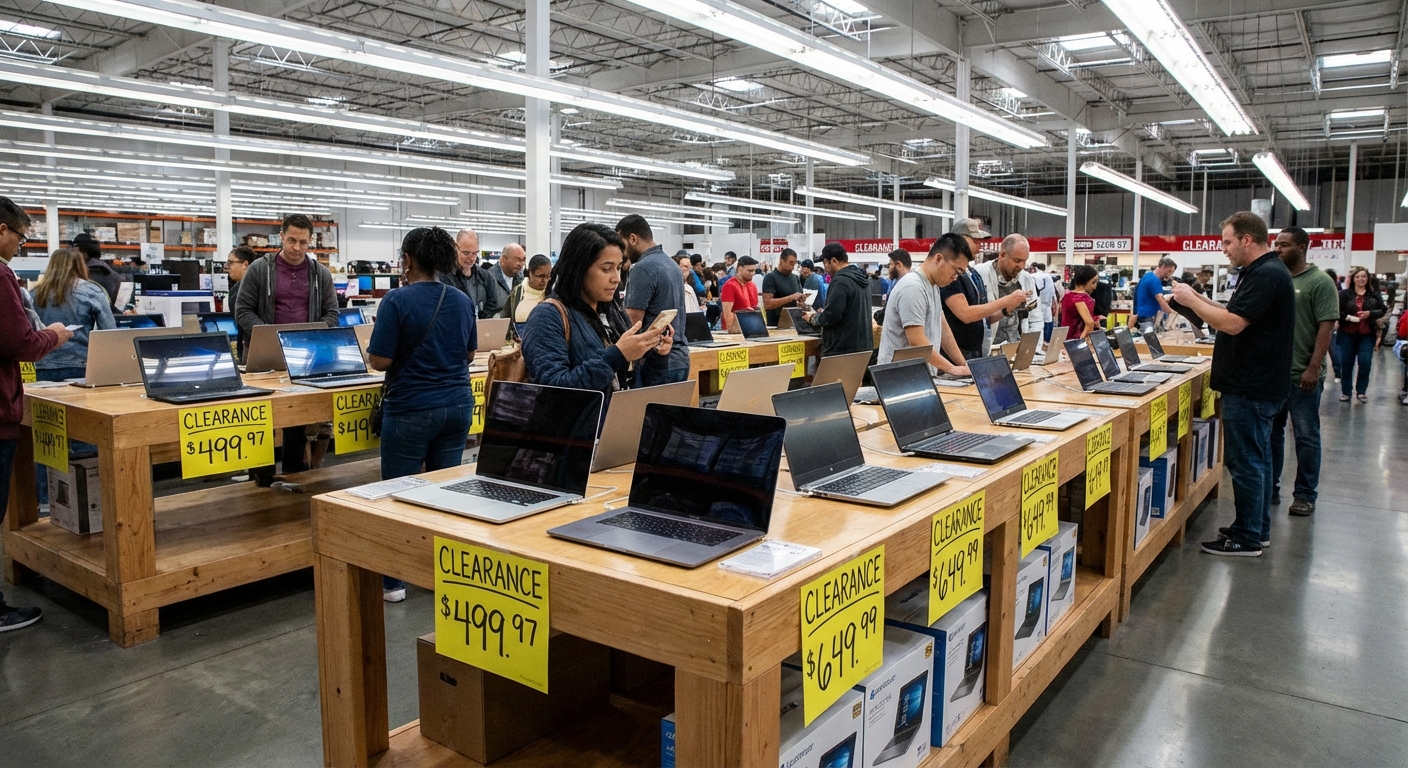
The Label Clues: Reading Costco Clearance Tags
I’m mildly obsessed with price tags now. If you’ve ever heard the lore around Costco pricing codes, some of it actually checks out.
From what I’ve tracked personally and cross-checked with multiple consumer articles:
- Price ending in .97 – Usually indicates a markdown/clearance price in many US warehouses.
- Price ending in .00 or .88 – Sometimes indicates manager-specific markdowns or localized stock reductions.
- Asterisks (\*) in the top-right corner – Typically means “limited to inventory on hand; not being reordered.” This is huge for laptops.
When I picked up a clearance HP Pavilion with a 13th-gen Intel Core i7 earlier this year, the tag ended in .97 and had the asterisk. I’d tracked that exact model for about a month—it went from $899.99 to $799.97, then a final drop to $699.97 when the refreshed model with a slightly newer CPU showed up.
Is the pricing code an official policy page on Costco.com? No. It’s not documented like a government regulation. But it lines up with what I’ve repeatedly seen in-store and with what retail analysts have described.
What Kinds of Laptops Actually Hit Clearance
Not every category sees the same kind of discounting. Looking at about six months of screenshots and notes I’ve kept (yes, I’m that person), certain patterns keep popping up.
1. Midrange Windows Laptops (The Sweet Spot)
This is where I’ve seen the most compelling clearance deals:
- Price range before markdown: $700–$1,200
- Common specs: Intel Core i5/i7 (11th–13th gen) or Ryzen 5/7, 16GB RAM, 512GB–1TB SSD, 14–16" 1080p or 2K display
- Discounts I’ve actually seen: $150–$400 off the previous regular price
These are often Costco-specific builds with more RAM/SSD than the same model sold at Best Buy or Amazon. When they’re on the way out, they tend to undercut other retailers pretty heavily.
2. Gaming Laptops
When I tested prices on mid-tier gaming laptops—think RTX 3050 / 4050 / 4060—with Costco’s occasional clearance events, the deals were good but not always best-in-class.
Pros:
- Often bundled with 2-year warranty (via Costco + manufacturer) and sometimes SquareTrade extensions
- Good for people who prioritize hassle-free returns over raw price
Cons:
- Costco’s gaming selection is narrower than dedicated tech retailers
- Sometimes one GPU generation behind (e.g., RTX 3050 when RTX 4060s are out)
If you care about FPS per dollar above all else, you’ll want to compare against specialized retailers and promotions like Lenovo’s student discounts or Newegg sales.
3. Chromebooks and Budget Laptops
This category is hit-or-miss.
I bought a clearance Chromebook for a family member—$159.97 down from about $249. That was fine, but not jaw-dropping compared with back-to-school promos elsewhere.
Where clearance can really matter is ChromeOS Auto Update Expiration (AUE). Some Costco Chromebooks on clearance were only 3–4 years from their AUE date. That means fewer security and feature updates left.
For Chromebooks, I now always:
- Check Google’s AUE list before buying
- Avoid anything with less than ~5 years of support left, unless it’s dirt-cheap and for very light use
The Costco Warranty & Return Angle (Massively Underrated)
On paper, a lot of clearance comparisons look like this:
- Amazon sale: $799
- Costco clearance: $829.97
At face value, Amazon wins. But when I factor in Costco’s protections, the calculus changes.
In my experience buying multiple laptops from Costco over the last five years:
- Return window: Costco typically offers 90 days on computers. I’ve actually returned a laptop on day 82 because of a flaky hinge—no drama, no restocking fee.
- Warranty extension: Costco often extends the manufacturer’s warranty to 2 years for many electronics (varies by region and program). On laptops, that’s real value.
- Credit card perks: If you use a card like the Costco Anywhere Visa, you can stack extended warranty benefits.
Is this worth paying $20–$50 more than a bare-bones online seller? For a lot of people, yeah. For power users who upgrade often and don’t care about after-sales support, maybe not.
Online vs In-Store: Where the Better Clearance Deals Hide
I’ve seen two separate clearance ecosystems:
- In-warehouse clearance – Yellow tags, .97 endings, the asterisk. These are often the best “surprise” deals but vary wildly by location.
- Costco.com clearance & limited-time deals – Sometimes labeled as “While Supplies Last” or part of coupon-book promos.
When I compared screenshots over time:
- Some laptops were cheaper in-store than online, especially when the warehouse just wanted them gone.
- Some laptops only ever hit clearance online, particularly higher-end ultrabooks that never got much shelf presence.
If you’re serious about scoring a deal, my routine now is:
- Check Costco.com > Computers filter for “Online-Only” and “While Supplies Last”
- Then visit a physical warehouse and scan the aisle for .97 tags and asterisks
The Catch: When Costco Laptop Clearance Isn’t a Good Deal
I’ve walked away from several “clearance” laptops even with a nice orange-ish tag. Here’s when I think you should be skeptical:
- Old CPU generations with minimal savings – An 11th-gen Intel Core i5 discounted by $80 when 13th-gen models are standard? Pass.
- 8GB RAM in 2025 on anything over $500 – For Windows, 8GB is now the bare minimum. If you multitask or keep a lot of browser tabs open, 16GB is where things stop feeling sluggish.
- Dim, low-quality displays – Several clearance units I’ve seen used low-brightness 1080p panels. For students or office workers under bright lighting, that’s an everyday annoyance.
- Short manufacturer support window – For business users, laptop lifecycle (firmware updates, reliable drivers) matters more than a one-time discount.
Clearance should be a bonus, not the only reason you buy. I always start with: does this config actually fit what you need for the next 3–5 years?
How I’d Hunt a Costco Laptop Clearance Deal Right Now
If I were shopping today for a solid all-around laptop with an eye on clearance pricing, here’s the exact playbook I’d use:
- Define non-negotiables: 16GB RAM, 512GB SSD, at least 300-nit display, Wi‑Fi 6, decent keyboard. No compromise here.
- Check Costco.com first: Filter laptops, sort by price, then scroll specifically for models labeled “Member Only Item,” “While Supplies Last,” or clearly reduced from their original price.
- Note 2–3 model numbers: Cross-check on manufacturer sites (HP, Dell, Lenovo) to see original MSRP and generation.
- Visit local warehouse: Walk the laptop aisle, scan for .97 prices with asterisks, and compare against your short list.
- Look up benchmarks on the spot: I quickly check CPU (e.g., Intel Core i7-1360P vs older 1165G7) and GPU performance using reputable review sites.
- Factor in total value: Include the warranty extensions and return flexibility in your mental price comparison.
When I’ve followed that process, I’ve landed on a couple of genuinely stellar buys—machines that were not just cheaper, but also better configured than similarly priced laptops at other big-box stores.
Final Thoughts: Who Costco Laptop Clearance Is Best For
Based on the patterns I’ve seen and the machines I’ve actually tested or helped friends buy, Costco laptop clearance tends to be best for:
- Families and casual users who want hassle-free returns and strong warranty support
- Students who need one solid midrange machine that’ll last a few years
- Non-IT professionals (teachers, sales reps, freelancers) who value stability and service over ultra-optimized pricing
It’s less ideal for:
- Hardcore gamers chasing the absolute lowest cost per frame
- Enthusiasts who want the latest CPU/GPU generation on day one
- People who like highly customizable or niche-brand laptops
If you’re willing to do a bit of homework—check generations, compare specs, and keep an eye on those .97 tags—Costco’s laptop clearance section can quietly be one of the better value spots in the big-box universe. Not magical, not mythical, but genuinely solid when the right model hits that yellow tag.
Sources
- Costco – Official Electronics & Computers Section - Current laptop offerings, warranty and return policy details
- Google – ChromeOS Auto Update Policy - Official list and explanation of Chromebook Auto Update Expiration (AUE)
- PCMag – How to Shop for a Laptop in 2024 - Expert guidance on specs, CPU generations, and value tiers
- Consumer Reports – How to Get the Best Deals at Costco - Insights into Costco pricing patterns and savings strategies
- Forbes – Costco’s Return Policy: What You Need To Know - Overview of Costco’s return and warranty advantages for electronics