Guide to Buying Laptops from Police Impound Auctions
I’d just fried my old laptop rendering video for a client at 2 a.m., and the prices on new machines made my eye twitch. A friend joked, “Why don’t you grab one from a police auction? People literally abandon MacBooks there.”
I laughed. Then I Googled it.
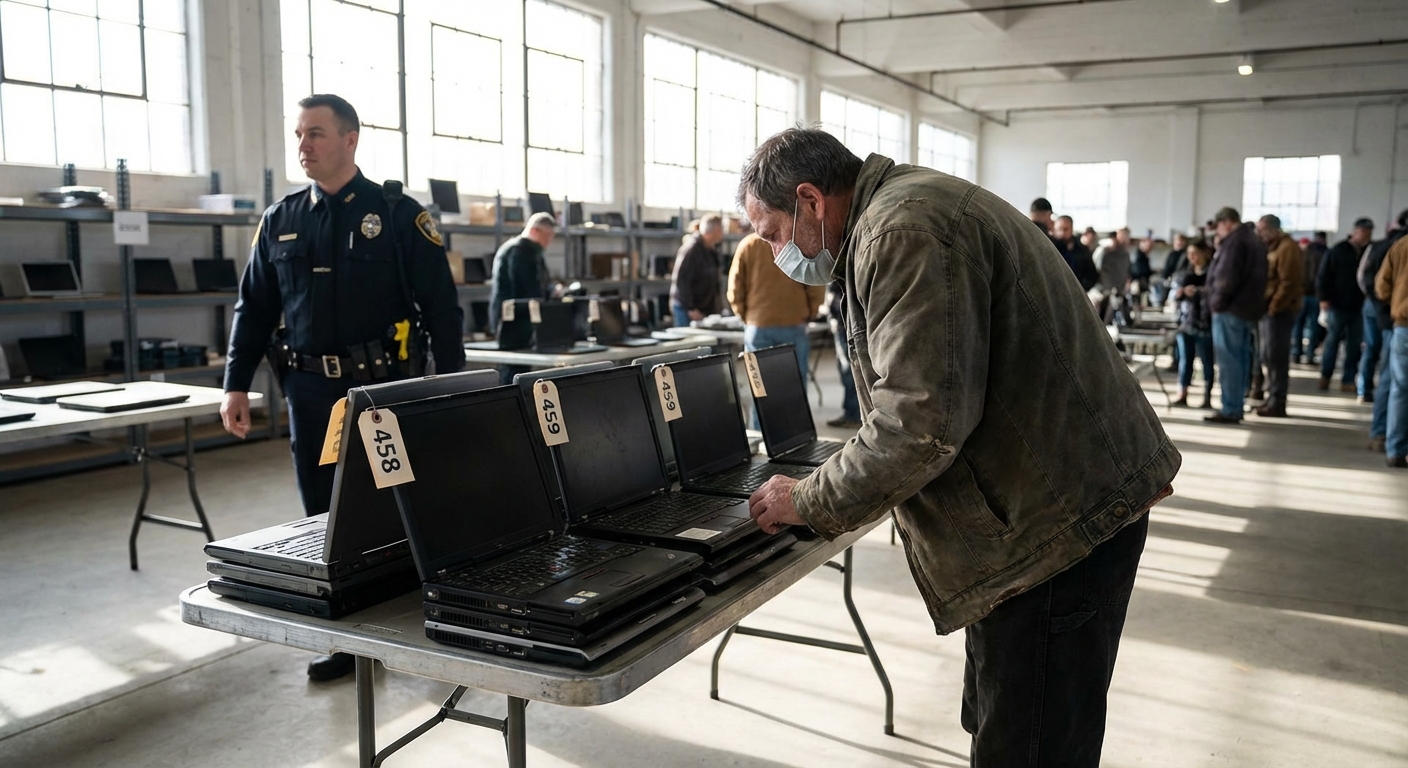
Three weeks later, I was standing in a county impound warehouse, bidding on a stack of dusty laptops that looked like they’d lived three separate lives. One of those machines is the one I’m writing this on.
This guide is everything I wish I knew before that first auction.
How Police Impound Laptop Auctions Actually Work
When I first started digging, I assumed “police auction” meant only seized items from dramatic raids. Reality is way less Netflix.
Most laptop lots at police or government auctions come from:
- Unclaimed property: Stuff turned in, never picked up.
- Evidence: Held for a case, then cleared for disposal.
- Lost & found: Transit systems, airports, campuses, then handed over.
- Government surplus: Older machines replaced by new hardware.
In the U.S., these items typically get funneled through platforms like GovDeals, PropertyRoom, or local government auction portals. Some are live, in-person auctions; others are fully online with photos and basic specs.
From a legal standpoint, police departments have to follow procedures for disposing of property—usually defined in state or municipal codes. For example, many cities require a public notice and a holding period before unclaimed items can be sold.
That’s the boring—but important—backstory. The exciting part is what you can actually get.
What Kind of Laptops You’ll Really See (Not the Fantasy Version)
I went in imagining rows of mint-condition MacBook Pros. Reality check: most auction laptops fall into a few categories.
1. Government surplus workhorsesThink Dell Latitude, HP ProBook, Lenovo ThinkPad. Business-grade, usually 3–6 years old. These are the hidden gems. In my experience, they’re often boring-looking but built like tanks.
2. Rough consumer laptopsAcer, older HP Pavilions, off-brand machines. These often have cosmetic damage, missing chargers, or an uncertain history. I treat these as “only if they’re dirt cheap.”
3. MacBooksThey do show up—especially 2015–2019 models in my area—but they go fast and attract emotional bidding. When I tested bidding on a 2017 MacBook Air, it shot from $120 to $410 in under a minute. At that price, the risk stopped making sense.
4. Completely unknown pilesLots labeled “10 mixed laptops – as is, no testing.” This is where you either score big or adopt 10 new doorstops.
On my first big score, I got a lot of three business laptops for $165 total. Two needed SSDs and RAM, one became a parts donor. After upgrades, I had a surprisingly solid daily driver for under $200.
Where to Find Police & Government Laptop Auctions
Here’s where I’ve personally found the best laptop deals:
1. Government surplus platforms
Sites like:
- GovDeals.com – used by thousands of agencies and schools.
- PublicSurplus.com – city, county, and school district gear.
- GSA Auctions (gsaauctions.gov) – federal government assets.
These are more “orderly” than the wild-west local auctions. Descriptions are still brief, but at least you get consistent formats.
2. Police / sheriff websites
Many departments link to their auction partners or list upcoming dates. I’ve found deals by searching things like:
> `[your city] police auction unclaimed property`
> `[county name] sheriff surplus auction laptops`
Sometimes the laptops are mixed into general impound auctions with bikes, tools, and random weirdness.
3. University surplus
Not technically police impound, but very similar vibe and often much better laptops. Most universities have a “surplus property” page and sell old staff machines—usually well-maintained business models.
The Real Pros and Cons (From Someone Who’s Lost Money There)
The upsides
1. Ridiculously low entry pricesI’ve seen:
- ThinkPads selling for under $70
- Lots of 4–5 laptops going for $150–$250
Even accounting for upgrades, you can land powerful hardware far below retail.
2. Business-grade machinesGovernment and enterprise laptops aren’t flashy, but they’re built for abuse. Magnesium alloy frames, spill-resistant keyboards, decent thermals. I’ve had better luck with ex-government ThinkPads than shiny consumer laptops.
3. Less obvious competitionEveryone’s chasing the flashy MacBooks. If you’re willing to grab a boring-looking Dell and drop in an SSD, you’ll win more often.
The downsides
1. "As-Is, Where-Is" really means as-isNo warranty. No returns. No crying later.
On one lot, photos conveniently didn’t show the side with the cracked hinge. That repair cost more than the laptop was worth.
2. Unknown history & data issuesI’ve had:
- Machines with BIOS passwords I had to reset the hard way.
- Laptops still showing a company asset tag.
- Drives that weren’t wiped properly (I always wipe everything regardless).
This isn’t plug-and-play shopping. You’ll test, reinstall OSes, maybe replace batteries or screens. If you hate tinkering, this route might not be worth the stress.
How I Evaluate a Laptop Listing (My Personal Checklist)
When I’m scrolling through lots of sketchy photos, this is what I look for.
1. Clear photos of ports and sides
Scratches don’t scare me; missing ports and bent frames do. If I can’t see the hinge area or both sides of the laptop, I get suspicious. Bent chassis = nightmare.
2. Power-on status
Best case: the listing says “powered on to BIOS/UEFI” or shows a photo of the BIOS screen. That tells me:
- The motherboard is alive.
- The display, GPU, and at least some RAM are functional.
If it says “untested – no power supply”, I treat it as a parts machine and bid accordingly.
3. Storage type
I love seeing:
- M.2 NVMe slots or 2.5” bays (even if the drive is missing)
Missing drive is fine; it’s actually a plus because I’d wipe it anyway. Bad sign is when the drive type is proprietary or soldered.
4. RAM configuration
I scan for:
- 2 RAM slots instead of 1
- Easily accessible bottom panel
Even if it comes with 4 GB, as long as I can upgrade it to 8–16 GB cheaply, it’s a candidate.
5. Battery and charger info
Batteries are consumables, so I assume many will be weak. But I check:
- Does it include a charger?
- Are OEM chargers shown in the photo?
If I need to buy a new charger and battery, that’s another $40–$80, which I factor into my max bid.
Bidding Strategy That’s Saved Me Hundreds
The first time I bid, I got emotionally attached and overpaid. Don’t do that.
Here’s how I handle it now.
1. Set a hard “all-in” number
I start with the machine’s realistic used value on eBay (sold listings only), then subtract:
- Cost of SSD/RAM upgrades
- New battery/charger if needed
- Buyer’s premium (often 5–15%)
- Sales tax
That final number is my absolute max bid. If the auction goes over, I walk away. No exceptions.
2. Ignore the crowd during live bidding
At a live auction I attended, a visibly cracked MacBook still hit $350 because people got hyped. Meanwhile, a boring HP EliteBook a few lots later slipped by at $80.
The move that’s worked for me: show up with a list of target lots and pre-calculated max bids, then treat it like a numbers game, not a treasure hunt.
3. Factor in your own time
If you value your time at even $20/hour, spending 6 hours fixing a $120 laptop you could’ve bought working for $260 isn’t always a win. I only go for machines that need light to moderate work—storage, RAM, OS—not full board repairs.
Data Security and Legality: Stuff You Really Can’t Ignore
Here’s where my inner nerd kicks in.
1. Always do a full wipeEven if the OS boots into someone else’s account, don’t poke around. It’s not your data, and accessing it can be legally questionable in some jurisdictions.
My routine:
- Create a bootable USB with Windows, Linux, or macOS installer.
- Use full-disk formatting or tools like `diskpart` or `gdisk` to wipe partitions.
- Reinstall clean.
On Macs, Activation Lock tied to an Apple ID can turn your shiny auction win into a fancy paperweight. If a listing doesn’t show a clean macOS setup screen or BIOS, I assume there may be a lock and bid much lower. For Windows, OEM licenses are often embedded in firmware, which is a nice bonus when it works.
3. Respect licensingDon’t assume every Office/Adobe install you see is yours to keep. I treat all software on an auction laptop as invalid and plan on using my own legitimate licenses or free alternatives.
Who Police Impound Laptops Are Actually Good For
From my experience, this path makes sense if you:
- Don’t mind opening a laptop and swapping parts.
- Are comfortable reinstalling an OS and drivers.
- Care more about performance-per-dollar than aesthetics.
- Can walk away from a bad auction without FOMO.
It’s less ideal if you:
- Need a guaranteed-working machine tomorrow.
- Hate troubleshooting weird tech issues.
- Want a specific, current-gen model.
For me, the sweet spot has been older business laptops that I can turn into surprisingly capable daily drivers. The machine I’m typing on is an ex-government ThinkPad I grabbed in a mixed lot for about $90 of its share, tossed in a 500 GB SSD and 16 GB RAM I had lying around, and it’s been rock-solid for two years.
Not every story ends that well—I’ve also bought a “lot of 4” where only one was truly salvageable—but once you detach your emotions and treat it like sourcing parts and potential, the math works out more often than not.
Sources
- General Services Administration (GSA) – GSA Auctions - Official U.S. government platform for surplus and forfeited property
- GovDeals – About GovDeals - Overview of how government surplus auctions operate
- U.S. Federal Trade Commission – Disposing of Old Devices - Guidance on data wiping and privacy when reusing devices
- Microsoft – How to Perform a Clean Install of Windows - Official instructions for wiping and reinstalling Windows
- Apple – Activation Lock for Mac - Details on Activation Lock and used Mac devices