Guide to Home Depot Clearance Deals and Discounts
random Tuesday night and walked out with a $299 smart thermostat for $62. That was the moment I realized: Home Depot clearance isn’t an accident—it’s a system. And once you understand the system, the deals start to feel almost unfair.
This is the guide I wish I’d had before I started hunting those orange and yellow tags.
How Home Depot Clearance Actually Works
When I first tried to get serious about Home Depot deals, I assumed “clearance” meant one big uniform thing. It doesn’t. In my experience, there are really three different types of markdowns you’ll see:
1. Regular Price Markdown
These are the basic sale prices—no magic here. It’s just the current promotional price. The tag usually has:
- A white or orange label
- A “WAS” and “NOW” price
- No “Clearance” wording
I still grab these if it’s something I truly need, but they’re not the jaw-dropping discounts.
2. Store-Level Clearance
This is where it gets fun.
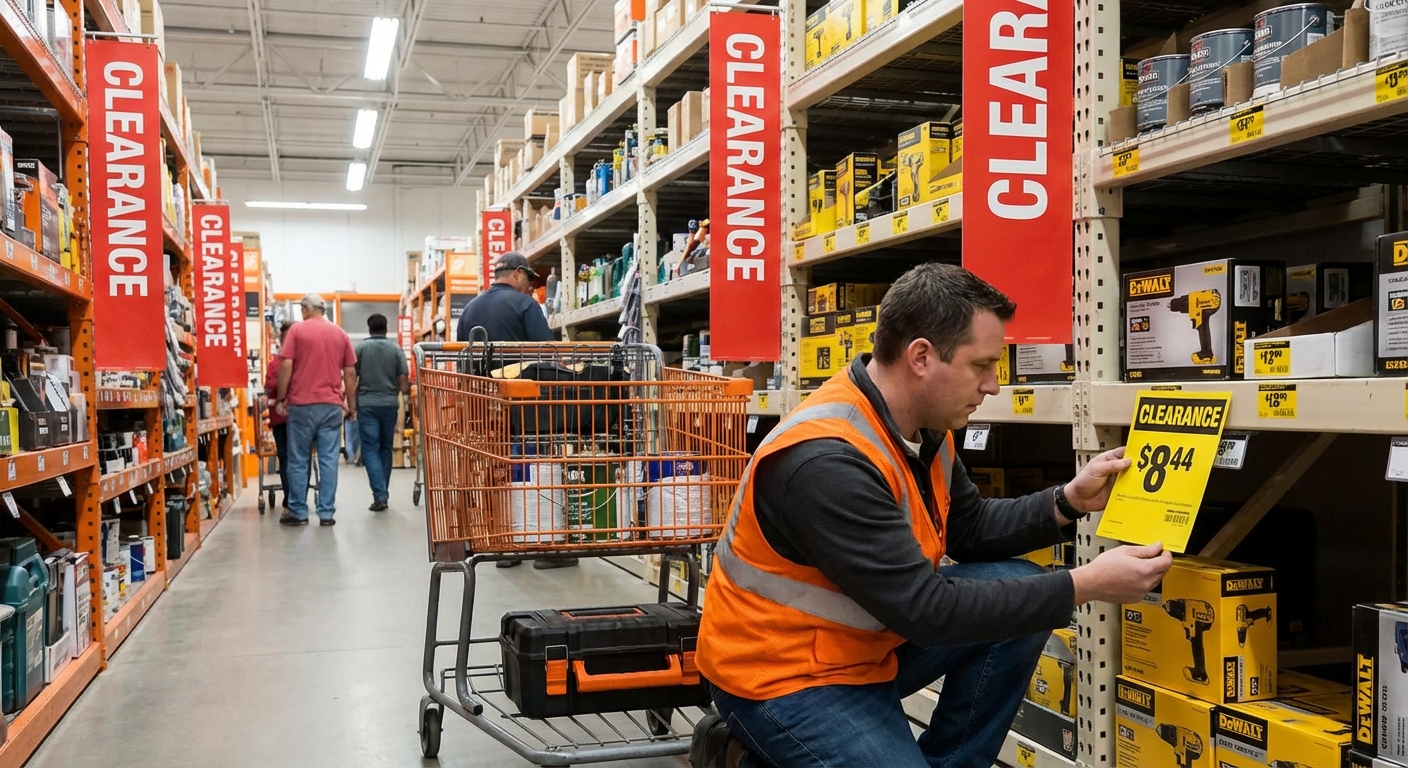
Every Home Depot store manages its own inventory quirks—local demand, returns, seasonal overstock. When I tested this by visiting three stores in one day (yes, I’m that person), I found the same cordless drill marked down differently:
- Store A: $169 regular price
- Store B: $129 markdown
- Store C: $89 clearance with a yellow tag
Same SKU, totally different reality. Store-level clearance tags usually:
- Are yellow or bright orange
- Say “Clearance” or “Reduced”
- Show a big percentage off (often 30–75%)
3. System/Corporate Clearance
This is when the entire chain is phasing out a product line or model. In my experience, this is where you see insane drops on tools, appliances, and smart home gear.
You’ll sometimes see:
- Huge drops over 60–80%
- A tag that looks like a normal price tag but with a slashed “WAS” price
- Limited stock across multiple stores
Sometimes you won’t even see it on the shelf—you have to scan or ask.
Reading the Price Tags Like an Insider
Once I started treating price tags like clues instead of decorations, my savings changed dramatically.
When I tested this with a random lighting aisle, I walked through and checked only tags that met three criteria:
- A .03 or .06 ending on the price
- A yellow or bright orange tag
- A “WAS” price significantly higher
Patterns I’ve repeatedly seen (and that match what deal hunters share on forums like Reddit’s r/HomeDepot):
- Prices ending in .06 often signal a first markdown
- Prices ending in .03 are frequently a final markdown before the item disappears
Example from my notes:
- LED flood light: WAS $39.98, now $23.06 → First markdown
- Same SKU 3 weeks later at another store: $11.03 → Final clearance, one left on the shelf
Is this an official policy you’ll find on Home Depot’s website? No. It’s pattern recognition from years of watching tags change, plus countless anecdotes from employees and shoppers. Use it as a guide, not gospel.
Best Times to Find Home Depot Clearance
I used to assume weekends were best. I was wrong.
Seasonal Transitions
The biggest scores I’ve found happen at season change-overs:
- Late January–February: Space heaters, holiday decor, some storage solutions
- Late March–April: Winter tools, snow blowers, some indoor lighting
- Late August–September: Patio furniture, grills, summer lawn care
- October–November: Air conditioners, fans, outdoor decor
When I asked a store associate (politely!) about timing, he told me their seasonal “flip” schedules are planned out weeks in advance, and they’d rather deep-discount bulky items than store them.
Best Days and Times
In my experience:
- Early weekday mornings (Mon–Thu) are gold—inventory is tidy, tags are freshly updated
- Right after major holidays (Memorial Day, 4th of July, Labor Day) often triggers markdown waves
Weekends are good for browsing, not for surgical clearance hunting.
Hidden Spots for the Best Deals
If you’re only checking the obvious clearance endcaps, you’re missing 70% of the treasure.
1. The Back-of-Store Clearance Aisle
Almost every Home Depot I’ve been in has some version of a “graveyard” aisle—usually near lumber, the back wall, or receiving.
This is where I’ve personally scored:
- A $349 Ryobi combo kit for $104 (missing one battery, which I already had)
- A $200 bathroom vanity top for $35 because of a tiny chip on the back corner you literally can’t see once installed
2. Top Shelves and Endcaps
Look up. No, really.
On the top stock shelves, I’ve found dusty boxes with old SKUs that ring up way cheaper than the tag shows. When I tested this with a random outdoor lighting box, it scanned at $14.03 instead of $59.97.
Tip: Use the Home Depot app to scan barcodes. I’ve seen discrepancies where the app shows a lower clearance price before the paper tag is updated.
3. Returns and Open-Box Sections
For appliances, tools, and power equipment, look for:
- “AS-IS” stickers
- “Floor model” notes
- Open-box items near the main displays
I once grabbed a returned dishwasher that had been installed for literally one day (wrong size for the buyer’s cutout) for about 40% of retail. The manager even threw in the installation kit.
Stacking Discounts Without Being "That" Customer
I’m not a fan of being pushy or gaming the system, but there are totally legit ways to stack savings.
1. Price Matching (Sometimes Even Against Themselves)
Home Depot’s official price match policy is on their site, and they’ll typically match:
- Competitor prices (including Lowe’s, Walmart, etc.)
- HomeDepot.com prices in-store
I’ve had multiple experiences where an item on clearance in the app was still full price on the shelf. I showed the app price to customer service and they honored it.
Always stay polite. I’ve had managers go above and beyond simply because I wasn’t acting entitled.
2. Credit Card and Rebate Stacking
When I tested stacking strategies, this combo worked well:
- Buy clearance item with a cashback or rewards credit card
- Use any manufacturer rebate if applicable
- Combine with Home Depot promos like “buy more, save more” when the system allows it
Not every clearance item stacks, but when it does, the effective price can be ridiculous.
3. Pro Xtra and Email Coupons
If you do frequent projects, the Pro Xtra program (Home Depot’s loyalty program) can quietly add up. I’ve gotten perk offers like:
- Dollars-off coupons
- Bulk purchase discounts
Plus, those occasional “$5 off $50” or “10% off one purchase” emails can be fantastic on already-marked-down items.
What’s Worth Buying on Clearance (and What I Avoid)
I’ve saved a ton on clearance, but I’ve also bought some incredibly dumb things. Here’s my personal filter now.
Great Clearance Targets
- Tools & Batteries: As long as they’re in sealed or lightly opened boxes, I’ve had excellent luck. Most major tool brands (DeWalt, Milwaukee, Ryobi) have solid warranties.
- Lighting & Fixtures: Major savings when lines change. Just verify the finish and sizes match your space.
- Outdoor Furniture & Grills: End-of-season markdowns can hit 70–80% off. I got a $600 grill for under $200 this way.
- Smart Home Gear: Old model doesn’t mean bad model. Clearance Nest, Ring, and Ecobee devices have been some of my best finds.
Clearance Red Flags
- Heavily damaged items where the damage affects performance or safety (cracked toilet base, bent ladder, damaged electronics)
- Weird, mismatched parts—like a vanity without a top that doesn’t match any standard size
- Obscure brands with no clear warranty info
When I asked a Home Depot associate in appliances about open-box washers, he flat-out told me: “If you can’t see it run, don’t risk it unless it’s stupid cheap.” That stuck with me.
Limitations and Reality Checks
I’ve walked into Home Depot hoping for a unicorn deal and walked out empty-handed more times than I can count.
Some honest truths:
- Clearance stock is inconsistent. What I find in my city might not exist in yours.
- Employees are hit or miss on how much they’ll help hunt down clearance SKUs.
- Policies can vary slightly by store and manager discretion.
To keep myself sane, I treat clearance hunting as a bonus, not a plan. I go in with a list of what I actually need, then scan clearance as a side quest.
When I tested this mindset shift, my impulse buys dropped a lot—and the deals I did grab were genuinely useful.
Practical Strategy You Can Use on Your Next Visit
Here’s the simple routine I follow now:
- Check the Home Depot app for your local store and search items you’re interested in. Look for weirdly low prices or limited stock notes.
- Head to the back or side aisles and locate the main clearance area.
- Walk each major department you care about (tools, lighting, garden, appliances) and scan for yellow/orange tags with .03 or .06 endings.
- Scan barcodes with the app—don’t trust shelf tags completely.
- Ask (nicely) at customer service if they can check other nearby stores for clearance on a specific SKU if you see a crazy markdown.
I recently did this on a Sunday “just browsing” trip and ended up with:
- Two LED shop lights (WAS $59.97, paid $15.03 each)
- A smart garage door opener hub (WAS $99, paid $29)
All because I took 10 extra minutes to walk the clearance zones and scan barcodes.
If you treat Home Depot less like a chore and more like a low-key treasure hunt, the savings can be genuinely game-changing—especially if you’re renovating, flipping, or just slowly upgrading your space.
Sources
- The Home Depot – Price Match Policy – Official description of in-store and online price-match rules
- The Home Depot – Consumer Credit Card & Offers – Current promotions, financing, and discount information
- Consumer Reports – How to Save Money on Appliances – Expert tips on timing and strategies for buying discounted appliances
- Forbes – Best Times to Buy Almost Anything – Data-backed seasonal timing advice for deal hunting
- U.S. Federal Trade Commission – Shopping and Pricing – Guidance on getting fair deals and understanding pricing practices