I Swapped My Laptop for a Mini PC: What Nobody Tells You Before You Downsize
it. If you’ve ever looked at those tiny computers on Amazon or YouTube and thought, “Can that thing really handle my life?”, this is for you.
I’ll walk you through what surprised me, what sucked, and how to tell if a mini PC is a game‑changer for you or just a cute paperweight with RGB lights.
What Even Is a Mini PC (And Why Are Tech Nerds Obsessed)?
When I first unboxed my mini PC, my brain basically screamed: “Where’s the rest of it?”
We’re talking about a full desktop computer shrunk into something roughly the size of a thick paperback book: usually around 5×5 inches, under 2 inches tall, and often under 1 kg. Inside, though, you’ll typically find laptop‑class hardware:
- Mobile CPUs like Intel Core i5/i7 U‑series or AMD Ryzen 5/7 6000/7000 series
- Integrated graphics (Intel Iris Xe or AMD RDNA2/3)
- SO‑DIMM RAM slots (often upgradable)
- M.2 NVMe SSD storage
- Wi‑Fi 6/6E, Bluetooth, Ethernet, and a suspiciously generous amount of USB ports
The concept is simple: ditch the bulky tower, keep most of the power.
What really pushed me to try one was travel. I was tired of laptop keyboards, overheating on my legs, and puny screens. I wanted a “desktop brain” I could plug into any monitor or TV.
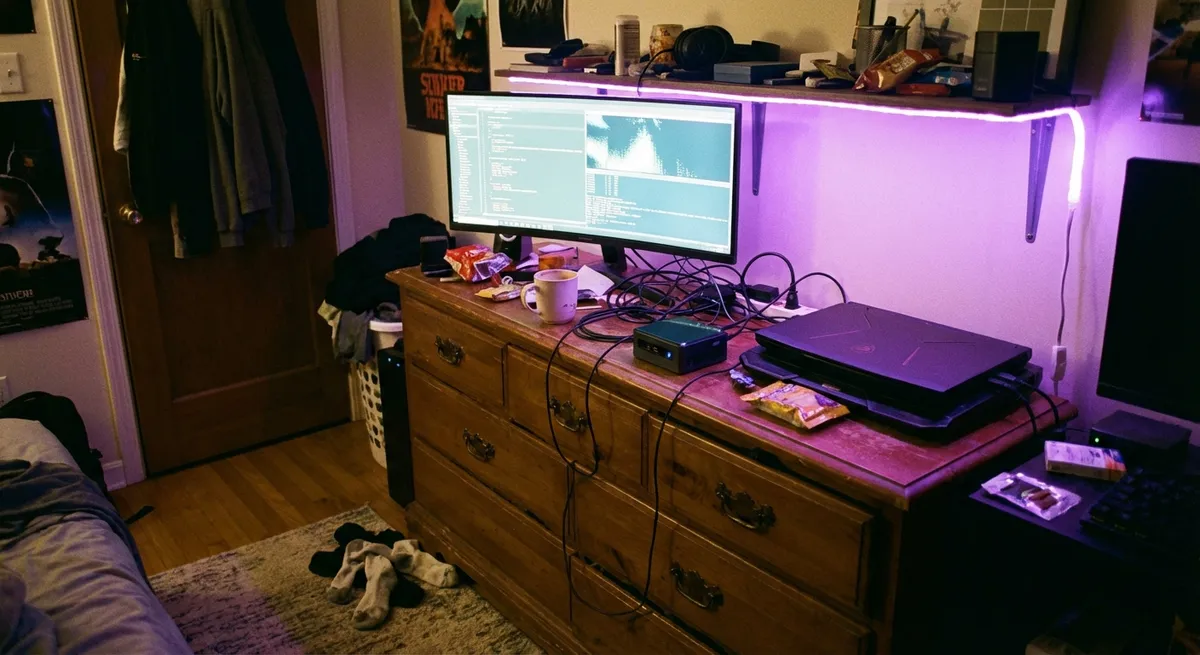
Brands like Intel NUC (now spun out to ASUS), Minisforum, Beelink, and even Lenovo’s Tiny series have turned this into a legit category. According to IDC and other PC market data, small form factor and mini PCs have been one of the few stable niches while traditional desktop sales have wobbled over the past few years.
So no, it’s not just a niche toy for YouTube reviewers—it’s quietly becoming a mainstream option.
How It Actually Feels to Use One Every Day
I’ll be honest: the first 24 hours were weird.
I went from “open laptop, start typing” to this little ritual: plug in power, HDMI to monitor, keyboard, mouse, done. It felt like setting up camp every time… for about two days. Then it just became muscle memory.
Here’s what jumped out at me most in daily use:
1. The silence is spooky (in a good way).When I tested mine under normal workloads—about 20 Chrome tabs, Notion, Spotify, and VS Code—the fan barely spun up. My old gaming laptop sounded like it was preparing for liftoff doing the same thing. Some models are even passively cooled (no fans at all), which blew my mind.
2. Thermals are way better than I expected.I stress‑tested mine with Cinebench and a couple of Steam games. Yes, the CPU hit 85–90°C under sustained load, but that’s normal for laptop chips and still below throttling territory on my unit. The chassis got warm, not hot. Compared with my laptop literally branding my thighs, this felt civilized.
3. Performance is “desktop‑enough” for most humans.For office work, coding, photo editing, even some light 1080p video editing in DaVinci Resolve, I didn’t feel held back. The bottleneck was usually my brain, not the CPU. On benchmarks, midrange mini PCs with Ryzen 7 6800H or Intel i7‑1260P land right around thin‑and‑light laptop performance.
4. Multi‑monitor setups are stupidly easy.When I first plugged in two 27" monitors and it just worked at 1440p 60 Hz, I actually laughed. Many mini PCs support dual or even triple 4K displays via HDMI + DisplayPort or USB‑C. Going from a 15" laptop panel to a dual‑monitor command center made me feel unreasonably productive.
5. You stop caring about portability in the usual sense.A laptop is portable and self‑contained. A mini PC is “portable brain, non‑portable limbs.” You need a display, keyboard, and mouse wherever you go. For me, that was fine because my travel destinations usually had a TV and I brought a foldable keyboard + mouse. But if you work in cafes a lot? It’s awkward fast.
The Stuff Nobody Mentions: Hidden Pros and Annoying Cons
I went into this expecting a tiny, cute desktop. What I discovered was a few underrated wins and some very real pain points.
The underrated wins
Upgrades don’t require a PhD in cable managementWhen I opened the case to add more RAM and a second NVMe drive, it took maybe 10 minutes and a tiny Phillips screwdriver. No jungle of SATA cables, no weird front‑panel headers. Just: flip it, unscrew, slot the RAM, done. For someone who’s built full ATX towers, the simplicity felt almost illegal.
Power efficiency is wildMy watt‑meter showed around:
- 8–12W at idle
- 25–40W under normal multitasking
- 60–80W under heavy load
Compare that to a traditional desktop pulling 200–400W doing similar tasks. Over a year of daily use, that difference is very real money on your electricity bill—especially in Europe or areas with high energy costs. The U.S. Department of Energy has been pushing small form factor and efficient devices in its ENERGY STAR programs for exactly this reason.
They double as “stealth gadgets” around the homeI turned mine into a hybrid work PC + living room media box. At night, it lives under the TV running Plex, Steam Remote Play, and emulators. I can stream games from my more powerful desktop, watch 4K HDR movies, or browse the web on the couch. It’s small enough that guests literally don’t notice it’s there.
The honest drawbacks
You’re locked into integrated graphics (usually)If you’re a serious gamer or 3D artist, integrated GPUs can only go so far. Modern iGPUs like AMD’s RDNA2/3 and Intel’s Iris Xe can handle esports titles and even some AAA games at 1080p on medium settings. But if you want ray tracing, 1440p ultra, or heavy CUDA/OpenCL workloads, you’ll hit a wall.
There are mini PCs with external GPU support (Thunderbolt / USB4) or even built‑in discrete GPUs, but they get pricier and bulkier fast—at which point a small tower might make more sense.
Port selection is weirdly inconsistentOn mine, I had:
- 2x HDMI
- 1x USB‑C (data + video)
- 4x USB‑A
- 1x 2.5GbE Ethernet
- Audio jack
Not bad, but on some cheaper models you’ll see:
- Fake “USB‑C” that doesn’t support video
- Limited USB bandwidth when multiple devices are plugged in
- No SD card reader (annoying if you’re a photographer)
I had to double‑check the specs and even Reddit posts from other owners before buying. The product listings can be… “optimistic.”
You’re at the mercy of tiny fans and cramped coolingWhile my unit stayed cool under most use, sustained 100% load did cause mild thermal throttling after ~15–20 minutes. That meant slightly lower clock speeds than the CPU’s theoretical max. Not a disaster for normal workloads, but if you’re doing long 4K renders or scientific simulations, a proper tower with beefy cooling will win every time.
How to Know if a Mini PC Actually Fits Your Life
When I helped a friend pick one, I made them answer three brutally simple questions:
1. What’s the heaviest thing you realistically do?
Not the dream scenario—what you actually do.
- Office, browsing, streaming, basic photo editing?
Mini PC is a strong match. Even entry‑level models with Intel N100 or Ryzen 3 chips are shockingly capable for this tier.
- Coding, light design, some video editing, light gaming?
Midrange mini PCs with Ryzen 5/7 or Intel i5/i7 are the sweet spot. That’s what I use: a Ryzen 7 model with 32GB RAM and a 1TB NVMe SSD.
- Heavy 3D, serious gaming, 4K editing with lots of effects?
You can make it work with higher‑end models + eGPU, but unless you really need the tiny footprint, a regular desktop will be simpler and cheaper per unit of performance.
2. How often do you actually leave your main desk?
When I tracked my own habits, I realized 90% of my “laptop use” was just… at a desk. Not on the go. Once I admitted that, a mini PC plus a cheap tablet for occasional couch browsing made more sense than an expensive do‑it‑all laptop.
If you:
- Work mostly at one or two fixed locations
- Can count “true mobile work” hours per week on one hand
Then a mini PC + monitors at those spots is surprisingly practical.
If you live in airports, coworking spaces, or lectures? Stick to a laptop.
3. Are you okay with external everything?
With a mini PC, nothing is built in:
- No screen
- No keyboard
- No trackpad
- No battery
It’s modular freedom and modular annoyance. For my setup, I leaned into it:
- 2× 27" monitors on arms
- Mechanical keyboard
- Vertical mouse
- Small USB audio interface
The flexibility is amazing, but you do need to invest in peripherals—and carry at least a few of them if you travel with the mini PC.
What I’d Do Differently After 30 Days (So You Don’t Repeat My Mistakes)
I made a couple of rookie errors that I’d fix immediately if I were buying again.
I underestimated storageI thought 512GB would be enough. It wasn’t. Between games, raw photos, and video footage, I ran out of space in like three weeks. Fortunately, my mini PC had a second M.2 slot, so upgrading to a 1TB primary + 1TB secondary SSD was painless. If you know you deal with big files, just start at 1TB. Your future self will thank you.
I cheaped out on RAM (temporarily)I began with 16GB “to see how it goes.” For basic tasks, it was fine. But juggling Chrome, Slack, Photoshop, and VS Code? Chrome alone ate half of it for breakfast. Upgrading to 32GB made everything feel instantly smoother, especially with multiple virtual desktops. Many mini PCs cap at 64GB, so there’s room to grow.
I didn’t check BIOS and firmware support firstSome mini PC brands are great at pushing BIOS updates, others… vanish. Intel NUCs (now ASUS NUC), Lenovo, and HP generally have solid long‑term support. Some off‑brand models might never get a microcode or security patch. After reading a few horror stories about buggy sleep modes and USB issues, I started checking manufacturer support pages before buying anything.
Should You Actually Ditch Your Laptop or Desktop?
Here’s my honest, non‑fanboy take after living with this setup:
A mini PC is brilliant if you:
- Mostly work at one or two fixed locations
- Crave a clean, tiny desk setup
- Want low power usage and quiet operation
- Do typical productivity, coding, content creation, or light gaming
- Like the idea of one “brain” that can move between home, office, and even TV setups
You’ll probably be disappointed if you:
- Need top‑tier 3D or gaming performance on a budget
- Move constantly between random locations without guaranteed displays
- Hate dealing with extra cables and peripherals
- Rely on long battery life away from outlets
For me, trading my main laptop for a mini PC turned out to be a weirdly liberating upgrade. My workspace feels more intentional, my machine is quieter and more efficient, and I kind of love that my “desktop” can fit inside a hoodie pocket.
If you’re mini‑PC‑curious, the smartest next step is to define your absolute must‑haves (ports, RAM, storage, GPU needs), then cross‑check a few models from reputable brands. And if you do make the jump, don’t be surprised when that tiny metal box ends up feeling a lot bigger than it looks.
Sources
- Intel NUC Product Overview (ASUS / Intel) – Background on one of the original mainstream mini PC platforms, with specs and form factor details
- AMD Ryzen 6000/7000 Mobile Processors – Official specs and capabilities of the laptop‑class CPUs commonly used in modern mini PCs
- ENERGY STAR – Computers Specification – U.S. government efficiency standards and data on power usage for desktops, small form factor PCs, and notebooks
- PCMag – Best Mini PCs of 2024 – Independent testing, benchmarks, and comparisons across popular mini PC models
- Tom’s Hardware – What Is a Small Form Factor PC? – Technical overview of small form factor and mini PC design, thermals, and upgrade considerations